0-1.8 s
Valley wide shot: the crowd behind piles of grey rocks throws them across the grass
Opens on the conflict from the proverb
This is the generator for the 15-second proverb reel: an angry crowd hurls grey stones across a misty valley, you stand unbothered in a tailored red suit, gather the stones from the grass, and watch them rise into a Gothic fortress before smiling down from the window — a 9:16 MP4 with the 'Unstoppable' soundtrack attached.
Ready in 4 to 9 minutes · no app, no signup

1 photo in → 15s AI video out
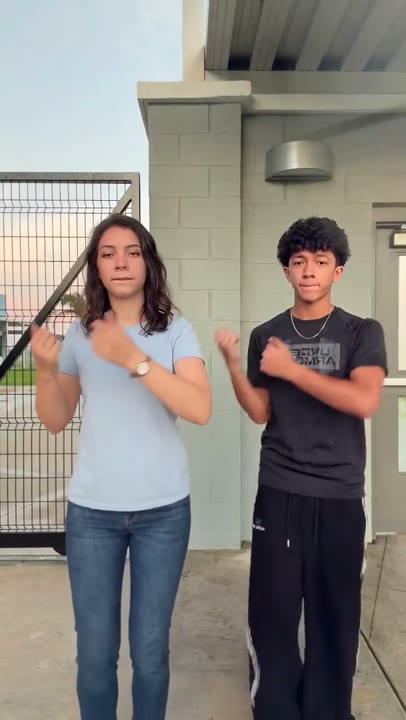
Source photo for this sample
Replaces the lead across all 15 seconds with synced sound.
Stones to Castle AI: They Threw Stones, You Built a Castle
Made with Sendare from the photo on the left. Every video follows the same camera cuts and timing with your photo in the lead role.
All 8 cuts in your 15-second Stones to Castle video. Every video follows the reference clip's camera cuts and timing, with the person or pet from your photo in the lead role:
0-1.8 s
Opens on the conflict from the proverb
1.8-3.1 s
Keeps the scene safe — no stone ever strikes anyone
3.1-4.3 s
First clear look at your face in the valley
4.3-5.4 s
Preserves the dramatic pacing of the Russian original
5.4-7.4 s
The pivot from target to builder
7.4-11 s
The transformation shot that drives shares
11-12.8 s
Payoff without throwing a single stone back
12.8-15 s
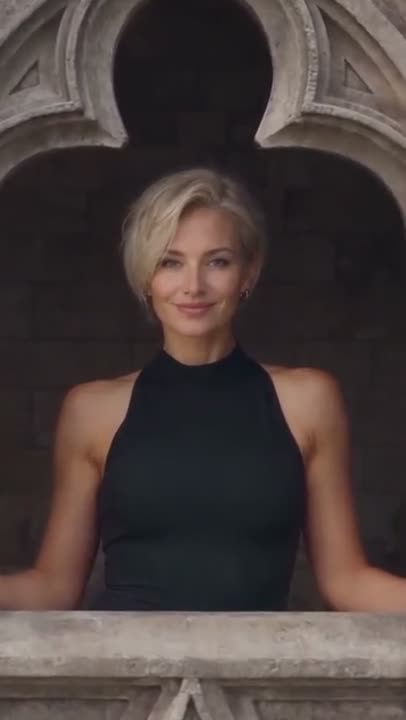
Closes on a tight close-up of your face
You get a 15-second vertical 720p video built directly from the viral October 21, 2026 Instagram film by @bognina_anastasia_ (which crossed 1.51 million likes in 24 hours). Rather than asking you to write a text prompt and hope a generic video model invents a castle, we run ByteDance's Seedance 2.5 in video-edit mode against the reference cut so every camera angle, stone throw, and spire rise matches the reel people recognize.
The face swap is the part buyers ask about first, so we published our own test instead of a stock demo: the guide linked below shows the exact portrait we uploaded next to the finished video at the castle-window close-up, with no third-party footage anywhere in the comparison.
We also tested where multi-cut crowd videos fail and published the failures. Anchoring the prompt on garment colour ('the woman in the red suit') breaks whenever a buyer uploads a photo wearing red — the model confuses the two and leaves the original actress on screen, which happened on a real order. Our production prompt anchors strictly on role and position (the single calm figure the stones are thrown at, who crouches, picks up a stone, and appears in the Gothic window) and locks you into the red valley suit and black window top regardless of what you wear in your photo.
Audio is handled separately from the model render. Passing a copyrighted song into Seedance 2.5 triggers upstream audio-fingerprint rejection and kills the entire job. We render the 15-second video silent and mux the soundtrack at the MP4 container level afterward, so your download arrives with sound and a near-zero audio rejection rate.
First-party benchmark: Measured on Sendare (2026-10-22): 15-second 720p vertical recast on Seedance 2.5 via APIMart settles in 5 to 12 minutes and includes the synced soundtrack.
Sound and audio: Your downloaded MP4 already includes the reel's dramatic 'Unstoppable' soundtrack synced to the castle rise. You can also download the silent MP4 on your order page if you want to attach the trending sound inside TikTok or Instagram Reels.
More on the Stones to Castle
Other languages
Also known as Stones to castle AI · Stones to castle AI trend · Castle from the stones · Stones into a castle · Build a castle with the stones they throw at you
Verified sources: Original reel by @bognina_anastasia_ on Instagram (21 Oct 2026, 1.51M likes). Updated October 28, 2026.
Captions: "They threw stones at me, so I built a castle" · "Keep every stone they throw at you. You'll need them for the walls." · "After the year I just had, this is the only energy I'm bringing into 2026."
Hashtags: #stonestocastle #unstoppabletrend #builtacastle #aitrend #redsuitcastle
AI video models redraw every frame from your photo. Here is how to fix the most common issues:
Switch to a straight-on portrait where both eyes and ears are equally visible; side-angle photos weaken identity lock on multi-cut crowd scenes.
Our vision gate blocks photos with a second person, sunglasses, or a cropped face before taking payment so you do not burn credits on an unusable input.
The Stones to Castle AI video prompt
Our one-tap generator runs this prompt automatically with the reference clip. You can also copy it for your own workflow:
Recreate the reference video shot for shot: a cloudy green mountain valley where a crowd of angry adult women behind piles of grey stones throws them toward one calm woman, the stones landing on the grass around her, then her hand picking one up, the stones rising into a dry stone wall that grows into a huge pale Gothic castle, and the crowd looking up open-mouthed. The only person to replace is the calm woman the stones are thrown at: the single figure who stands alone in front of the crowd, crouches under the falling stones, picks up a stone, and appears in the final castle-window shot. Replace that short-haired blonde woman with the exact person in the reference image in every frame from start to finish: copy their exact face, facial bone structure, eyes, eyebrows, nose, lips, skin tone, hair colour, hair length and hairstyle from the reference image. Do NOT keep the reference actress's short blonde hair, her facial bone structure, her eye colour or her skin tone, and never revert to the reference actress in any shot. Dress the replacement in the clothing the lead woman wears in the reference video — the tailored red suit in the valley shots and the black sleeveless halter top in the castle-window shot — not the clothes from the photo. Keep the valley, the mountains, the crowd of women and their own faces, the piles of stones, the growing wall, the castle, the camera moves, the cuts and the exact timing unchanged. Nobody is ever hit: the stones land on the grass. Exactly one calm woman, one head per person, no text, no watermark.
Start with the $6.90 Mini Hook Pass (50 credits for 1 standard 480p video) or choose a 720p Full HD pass (100 credits per HD video, with 15-second Seedance 2.5 recasts and synced sound). Unused credits stay on your order page and never expire.
Mini Hook Pass — $6.90
Most popular · Try it first · 1 Standard Video (480p) (480p · fast preview)
Single Video Pass — $9.90
720p Full HD · 1 HD Video (720p) ($9.90 / HD video)
Duo Pack — $16.90
Save 15% · 2 HD Videos ($8.45 / video)
Creator Trio Pack — $22.90
Save 23% · 3 HD Videos ($7.63 / video)
Party Studio Pack — $49.90
Best Value · 8 HD Videos ($6.23 / video)
Yes. Our guide links a 13-second comparison made from our own paid test: the exact portrait we uploaded on the left, the finished 720p video at the castle-window close-up on the right. The face, hairline and hair colour carry across; the outfit becomes the reference's black top, because the template supplies the costume. No stock footage or someone else's result is used in that clip.
No permanent official one. The 'CapCut · Try this template' buttons on TikTok are user-made links that break when the post is deleted or the template is region-locked, and even a working one composites you onto the author's recorded footage instead of putting your face on the lead for all eight shots. Our CapCut guide explains what a template can and cannot do, and how to edit the finished MP4 in CapCut afterwards.
A 15-second 720p Seedance 2.5 video-edit job costs several dollars in raw GPU compute per run. We charge $9.90 one-off for one full video (or down to $6.23 each in the 8-pack) with Apple Pay, Google Pay, or card, no account required, automatic credit return on any failed render, and a 14-day refund guarantee.
On October 24, 2026 we audited both: Stones2Castle.com requires Google sign-in before checkout and marks its likeness feature beta, while MakeViral charges 228 credits per 15-second run behind a $39 minimum pack. Here you pay $9.90 for a single video with no login, and the before-and-after clip on our guide was made from an uploaded portrait rather than a written description.
Yes. The soundtrack is muxed into the MP4 after rendering so you can post directly, and your order page also includes a one-tap Silent MP4 button.
The $6.90 Mini Hook Pass (50 credits) makes 1 full video in 480p Standard. For 720p Full HD (100 credits per video), the $9.90 pass makes 1 HD video, the $16.90 pack makes 2 ($8.45 each), the $22.90 pack makes 3 ($7.63 each) and the $49.90 pack makes 8 ($6.23 each). All passes are one-time payments with no subscription, and you can spend credits on any template.
We check the photo as you upload and tell you what we see — angle, framing, sharpness, uncovered eyes — but the check never blocks you. If something looks like it will soften the result we say what and leave the call to you. The only hard filter is the video model's own safety pass at render time, and if it refuses, the credits come back to your order automatically.
Yes. Your finished MP4 ships with the trend's soundtrack already synced to the moves. Your order page also has a one-tap 'Silent MP4' button if you prefer to download a muted version and attach the official sound inside TikTok, Instagram Reels or YouTube Shorts.
Right after payment you land on your private order page, and we also email your direct order link to the address you entered at checkout. On any phone or computer, you can also click 'Find my orders' in the top bar and enter your email to receive all your video links and remaining credits.
If a video fails to generate, times out, or is refused by the model's safety filter, its credits return to your order automatically so you can try again at no cost. Unused credit packs and duplicate or erroneous charges are refunded in full within 14 days by emailing support@sendare.co with your order reference (starts with SND-).
One credit balance works across every trend. Pick another template and star in that clip too: